

SvnRev: a utility for Subversion and CVS/RCS
Stamp your applications or components with revision numbers
SvnRev is a little program that writes the current revision number of project into a C/C++ header file, a Java package file, a C# class file or an Ant property file. This revision number is stored in constants (macros in the case of C/C++), both as a number and as a string. It gets the revision number from the “RCS keywords” in the source files, or (for recent versions of Subversion) from the “working copy” database. SvnRev is specifically designed for the Subversion version control system, but it can also be used with CVS and RCS.
SvnRev is a self-contained utility that does not rely on a particular IDE. SvnRev is a portable utility and should run on every environment on which a conforming C compiler is available. Our aim was to use it from a “makefile” and to attach to a version control system, and specifically to the Subversion system.
Downloads & license
SvnRev is copyright (c) 2005-2022 CompuPhase; it is distributed under the
zlib/libpng license.
The downloads below are for SvnRev version 2.2.6654:
- Source code (9.7 KiB)
- The source code of the utility, which can be built with any ANSI C compiler —see the build instructions. The source code for SQLite is not included in the archive; please download it from http://www.sqlite.org/.
- Win32 binary (229 KiB)
- A pre-built utility for Win32, including support for “wildcard characters” in the filename(s).
- Linux binary (287 KiB)
- A pre-built utility for Linux.
Why use SvnRev?
Computer programs have versions. Each component (DLL, ActiveX object, OLE server, embedded firmware, etc.) may have its own version. If the world were perfect, there should not exist two different components with the same version number. In practice, “stealth” upgrades happen, especially during the beta period. There are numerous different releases of MSVCRT20.DLL that all have the same version number 2.11.000. In a similar way, incompatible releases of CTL3D.DLL version 1.0 and COMDLG32.DLL version 4.00 are “out there”.
SvnRev comes of age. At the time SvnRev was first developed, the three files cited above could be found on many systems. Stealth upgrades still happen these days, though.
What is needed to distinguish the various components from each other is to attach a “revision number” to the version string of the component. When such a scheme is set up (and the revision number is part of the version number), developers no longer accidentally release an updated component with exactly the same version stamp as the previous release. When the version number is present in the “About” box and/or in the version resource, the user can quickly verify exactly what version he or she has, and when this is communicated to the developers, bugs might be quite a bit easier to reproduce.
In more popular terms: if you have ever asked a customer or a colleague “of what date is that component?”, you should consider using SvnRev. File date/time stamps have a (well deserved) reputation of being unreliable.
There are several utilities to maintain an automatically increasing build number for every compile. However, this has the disadvantage that there is no direct link between the build stamp and the version control. To get such a link, you would need to check in the file that holds the current build number into version control. In multi-developer groups, this machine-generated, frequently changing file, will become a nuisance for the version control system. Actually, you do typically not put machine-generated files in version control.
SvnRev uses a different approach: it queries the build number from the keywords
that a version control system maintains in a source file and/or from the Subversion
database. More specifically, SvnRev uses the “$Id:$” keyword (and
optionally two others). Subversion has the convenient property that it uses only
a single revision number for an entire project, instead of a separate revision
number per file. This is not the case with CVS and RCS; see the section
“Using SvnRev with CVS & RCS” for details on using
SvnRev with CVS/RCS.
SvnRev does assume that you commit your changes to version control before you send a product/update to someone. If SvnRev detects a difference, it adds a “modified flag” to one of the macros/constants that it generates and an automatically increasing “build” number to another. The reasoning behind this is that if your local copy of the source code contains changes that are not yet in version control, the revision number of the application/component that you sent is linked to the wrong revision number in Subversion. With the automatically increasing build number, the full version/build number is still likely to be different from any earlier application/component that went out of the door (unless you use version control badly), but finding the correct revision back may be hard —especially with multi-developer groups. Therefore: commit your changes first, then build the final release that you will deploy.
How to use SvnRev?
The first step is to ensure that the source file is in version control: obviously, a file that is not known in Subversion or CVS/RCS system will never get assigned a “revision numbers” by that system.
You need to adjust your makefile or project (or “solution”) so that SvnRev runs
over all source (and header) files, as part of the build process. This is easy
to do in Unix or Linux, because of the powerful command shells and because of
the versatile GNU make utility.
Running svnrev *.c *.cpp *.h lets the shell expand the
wildcards and have svnrev run over all files. To get the same
functionality under Windows, you must link the program with an additional
(compiler-supplied) object file —see the build instructions.
SvnRev has the following options (grouped by purpose):
| Option | Description |
|---|---|
| -jpackage | The option -j writes a Java package file instead of a C/C++ header file. The name of the package must follow the option (the default package name is “com.compuphase”). |
| -cnamespace.class | The option -c writes a C# class file instead of a C/C++ header file. The name of the namespace and class must follow the option; namespace and class names are separated by a period (the default namespace/class string is “compuphase.svnrev”). |
| -Oname | The option -O writes an Oracle this option creates a Oracle package file instead of a C/C++ header file. The name of the package must follow the option (the default package name is “svnrev.sql”). |
| -P | The option -P writes a “property file” for Apache Ant instead of a C/C++ header file. The name file is “svnrev.property”. |
| -pfilename | The option -p causes the fields AssemblyVersion and AssemblyFileVersion to be updated in the Assembly Property file (usually “AssemblyInfo.cs”). The -c should be set as well. |
| -s | The option -s writes a tab-separated file with version information and modification status for each source file. |
| -ofilename | The option -o allows you to specify the name of the generated include file. The default name is “svnrev.h” for C/C++ mode, “SvnRevision.java” for Java mode and “SvnRevision.cs” for C# mode. When you add “-omydefs.h” to the command line (without the quotes), the utility creates the file “mydefs.h” instead. When you say -o or -o- (without gluing a filename directly behind the option), the results get written to stdout. |
| -b | The option -b disables writing an automatically increasing “build” number in the svnrev.h, in case one or more of the source files are modified since last commit. |
| -i | The option -i is for incremental running. This switch makes SvnRev scan the “svnrev.h” generated from a previous run, in addition to the (partial) set of source files. This switch may be important when using SvnRev in a makefile, see below. If you use the -o in addition to -i, SvnRev will look for the filename specified with the -o option instead of svnrev.h, SvnRevision.java or SvnRevision.cs. |
| -fpattern | The option -f adds a prefix or a suffix (or both) to the build number in the string constant SVNREV_STR. The format for pattern is “prefix#suffix” (without the quotes) where the # symbol gets replaced by the build number and prefix and suffix are arbitrary strings. |
| -mname | The option -m changes the base name (or prefix) of the generated constants. By default all generated constants start with SVNREV, but this can be changed with this option. |
| -n | The option -n makes SvnRev ignore line endings (CR versus LF versus CR+LF) when comparing the working copy to the base version. |
| -v | The option -v causes SvnRev to list the names of files that were modified after the last commit to version control on stderr (console output). |
In a makefile, you need to add a new target that runs over all the files. The
generated include file needs to be updated only if a file changes. Most make
utilities provide the automatic variable “$^” that results in the
list of prerequisite source files (also called “dependencies”), separated by
space characters.
svnrev.h : main.cpp gui.cpp gui.h storage.cpp storage.h
    svnrev $^
The GNU make utility and several others provide an automatic
variable “$?” that holds the names of all the prerequisites that
are newer than the target, with spaces between them. By using this variable,
svnrev runs only over the modified files, which is, of
course, quicker. In this situation, you will also need to tell SvnRev to run
incrementally (the -i option).
svnrev.h : main.cpp gui.cpp gui.h storage.cpp storage.h
    svnrev -i $?
Next, include svnrev.h in any C/C++ source file and/or the
.RC resource file and use the macros that SvnRev has generated.
For Java and C# use the corresponding output files (instead of svnrev.h).
SvnRev creates and updates the following macros/constants:
SVNREV_NUM- The number of the current revision.
SVNREV_STR- The same number as above, but encoded as a string, and possibly decorated with
a prefix and/or suffix set with the
-foption.
When the letter “M” appears behind the number, one or more of the source files have uncommitted changes (meaning that the build number may not be a good representation of the current build); see alsoSVNREV_MODIFIED, below. SVNREV_RCS- The current revision number encoded as a string (like
SVNREV_STR), but formatted as an RCS indentification string (so with a “$Revision:” prefix and a “$” suffix). The prefix and suffix set with the-foption do not apply. SVNREV_DATE- The date of the revision, encoded as a string in the format YYYY-MM-DD.
SVNREV_STAMP- The date of the revision, encoded as an integer in the format YYYYMMDD. This format may be convenient when “using SvnRev with CVS & RCS”.
SVNREV_MODIFIED- Set to zero (0) if all source files are up-to-date in version control, and
to a non-zero value if one or more of the source files have uncommitted
changes. If there are non-committed changes, the value of the
SVNREV_MODIFIEDconstant is incremented every time that SvnRev runs; it functions akin to a “build” number. As soon as all sources are committed to version control, the value is reset to zero.
The automatic increment of this number can be disabled with option-b. If this option is set,SVNREV_MODIFIEDis 0 (unmodified) or 1 (modified).
You can use this macro to conditionally print a warning message at the start of your program, for example. To find out which files have uncommitted changes, use the-voption.
When SvnRev is used with CVS or RCS, this value will always be zero.
The names of the constants may be different if the-moption is used on the command line of SvnRev. For example, with the option-mAPP, the constant with the revision date will beAPPDATEinstead of the defaultSVNREV_DATE.
An example of a generated file is:
/* This file was generated by the "svnrev" utility
 * (http://www.compuphase.com/svnrev.htm).
 * You should not modify it manually, as it may be re-generated.
 *
 * $Revision: 4224$
 * $Date: 2011-02-22$
 */

#ifndef _SVNREV_H_
#define _SVNREV_H_

#define SVNREV_NUM      4224
#define SVNREV_STR      "4224"
#define SVNREV_RCS      "$Revision: 4224 $"
#define SVNREV_DATE     "2011-02-22"
#define SVNREV_STAMP    20110222L
#define SVNREV_MODIFIED 0

#endif /* _SVNREV_H_ */
An example Java package file is:
/* This file was generated by the "svnrev" utility
 * (http://www.compuphase.com/svnrev.htm).
 * You should not modify it manually, as it may be re-generated.
 *
 * $Revision: 4224$
 * $Date: 2011-02-22$
 */

package com.compuphase;

public interface SvnRevision
{
    public final static int    SVNREV_NUM = 4224;
    public final static String SVNREV_STR = "4224";
    public final static String SVNREV_RCS = "$Revision: 4224 $";
    public final static String SVNREV_DATE = "2011-02-22";
    public final static long   SVNREV_STAMP = 20110222L;
    public final static int    SVNREV_MODIFIED = 0;
}
In your source files, you can now use these macros/constants where you would otherwise type a build or revision number. SvnRev defines both a numeric macro and a string macro so that you can take advantage of the string concatenation feature of the ANSI C preprocessor (also used in C++ and resource files).
Somewhere in your program, you will now use one or more of the macros to display the revision number. If you make a simple console program, you could, for example, print it in the usage information, like in the example below (which comes from the source code of SvnRev):
printf("svnrev 2.2." SVNREV_STR "\n\n");
RCS keywords
For “working copies” created by clients compiled against the Subversion libraries
version 1.6 and earlier, there is another requirement: the source files should
all contain “RCS keywords” and have the property “svn:keywords”.
For “working copies” created by Subversion 1.7 clients (and later), this step is
optional.
How do you know whether a working copy is in the “1.7 format” or an earlier format?
Go to the root folder of a project on your local hard disk. There will be a.svndirectory in it. Look inside the.svnfor a file calledwc.db; if it is present, this is the “1.7” format. For a summary of the changes, see the Subversion 1.7 Release notes.
The RCS keywords should be present in all source files: header files as well the code files. A keyword looks like:
$Id$
The version control system will expand this to something like the line below:
$Id: svnrev.c 3116 2005-03-18 16:26:29Z thiadmer $
A C compiler does not like lines like the above in the source code, so typically
a keyword is expanded in a comment, or in a string. As a more complete example,
the code below is from the svnrev.c source file:
/*
 * Version: $Id: svnrev.c 3116 2005-03-18 16:26:29Z thiadmer $
 */
The following keywords are supported by SvnRev. Note that the “$Id:$"
keyword contains all the required information, so this is often the one that you
will want to use in the comment that you have at the top of each source file.
$Id:$- A standard header containing the RCS file name, revision number, date and time, author, status, and the login name of the user who commited the revision (or who has locked the file).
$Date:$- The date and time the revision was checked-in.
$Rev:$- The revision number assigned to the revision.
$Revision:$- Another name for
$Rev:$.
Furthermore, to expand keywords, each file must have the property “svn:keywords”,
and this property should have the value "Author Date Id Rev" (you may use
“Revision” instead of “Rev”). You can add these to the files explicitly, or
configure Subversion on your client to add them automatically —see below.
Configure Subversion for automatic keyword properties
To have Subversion expand RCS keywords, a source file should both contain an RCS
keyword and have a property called svn:keywords (which must be set
to an appropriate string).
Subversion clients allow you to set the properties of each file individually. The
three screen grabs below illustrate setting the property to an appropriate value.
Click on the pictures for a detailed view.

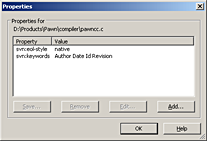
The file properties dialog for TortoiseSVN

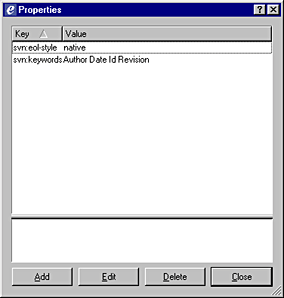
The file properties dialog for eSvn
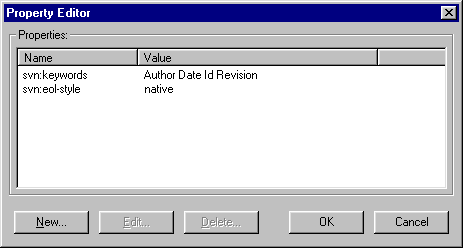
The file properties dialog for RapidSVN
To speed things up, TortoiseSVN allows you to set properties on a directory. The Subversion client will then assign these properties to all the files in the directory (the file inherit the settings of the directory). Note though that if you query the settings of the directory, the TortoiseSVN will show an empty property list —even though the properties are set on every file in that directory. With the command line client, you can use wildcards to achieve the same effect.
Apart from setting these fields explicitly for every file that you add, you may
have Subversion set them automatically. This behaviour must be enabled in the
Subversion “config” file on the client. You will find this file in
the “Subversion” folder below the “Application Data” folder, in the user's profile.
The file is called “config”, without extension. If you are using
TortoiseSVN, you can edit this file from TortoiseSVN's “Settings” dialog; for
other clients, you may need to locate the file and load it into Notepad or another
suitable editor. In the configuration file, you will be looking for the enable-auto-props
keyword and the [auto-props] section (which are commented out by default).
You need to remove the comment markers (the “#” character) and add the property
svn:keywords=Rev Date Id to selected file extensions. Below is a
snippet from a config file after this adjustment.
[miscellany]
### Set enable-auto-props to 'yes' to enable automatic properties
### for 'svn add' and 'svn import', it defaults to 'no'.
### Automatic properties are defined in the section 'auto-props'.
enable-auto-props = yes

### Section for configuring automatic properties.
### The format of the entries is:
###   file-name-pattern = propname[=value][;propname[=value]...]
### The file-name-pattern can contain wildcards (such as '*' and
### '?').  All entries which match will be applied to the file.
### Note that auto-props functionality must be enabled, which
### is typically done by setting the 'enable-auto-props' option.
[auto-props]
*.c = svn:eol-style=native;svn:keywords=Author Rev Id Date
*.cpp = svn:eol-style=native;svn:keywords=Author Rev Id Date
*.h = svn:eol-style=native;svn:keywords=Author Rev Id Date
*.dsp = svn:eol-style=CRLF
*.dsw = svn:eol-style=CRLF
*.sh = svn:eol-style=native;svn:executable
*.txt = svn:eol-style=native
*.png = svn:mime-type=image/png
*.jpg = svn:mime-type=image/jpeg
Using SvnRev with CVS & RCS
When you use CVS or RCS, SvnRev can extract the revision number and the date from the keywords as well. The CVS and RCS system use the same keywords as Subversion, except that they often use $Revision:$ instead of $Rev:$. There is no need to enable keyword expansion (per file) with CVS/RCS. In contrast to Subversion, keyword expansion is always done on a check-in (or “commit”) —there is no need to configure file properties.
An important feature of Subversion is that it uses a single revision number for a complete project. CVS and RCS have a revision number per file. The SvnRev utility now has to make up a unique number that represents the revision for the complete set of files. SvnRev does this in the same way as the cvs2svn.py script: every commit of a file counts as a new revision of a project. In brief, this means that the revision numbers of individual files are accumulated. The total is the “project revision” number.
Unfortunately, this scheme does not allow a simple lookup of all revisions of the source files that are part of a particular project revision. That is, if a customer reports a bug related to revision “4351” of the complete application, this application consists of several source files that each have their own revision number —but none of these files will have revision “4351”.
One option is to check in the generated svnrev.h file at selected
milestones. Alternatively, you can use the revision date as the criterion for
retrieving an older revision. The macro SVNREV_DATE
holds the date of the latest modification in a string format; the macro
SVNREV_STAMP also has the date encoded in an
integer, in YYYYMMDD format.
Did I not write earlier that date/time stamps are unreliable, whereas I am now
suggesting that you rely on them? Well, yes, but... before I was talking about
the date/time stamp of a file. These are unreliable. The date stamp
in the SVNREV_DATE is that of the commit,
which is stored in the CVS repository and which can be relied upon.
Building SvnRev
The source is build to be portable, and I have successfully compiled it under Microsoft Windows using Borland C++ and OpenWatcom C/C++, and under Linux using GCC.
For Subversion version 1.7 clients (and later), SvnRev has a dependency on
SQLite.
The “working copy” format of Subversion has changed significantly in version 1.7
and the meta-data for a working copy is now stored in a SQLite database, which
means that SvnRev has to be able to read SQLite databases, too. You can optionally
build SvnRev without SQLite, thereby supporting only working copies of
Subversion clients up to 1.6. To compile without SQLite, add the definition
NOSQL on the command line when building SvnRev.
The shells under Unix and Linux expand wildcards in filenames to a list of all
matching files. The command line shell of Windows is bare-bones when compared with
BASH (and cousins), and it does not provide features like expanding the
filenames with wildcards on the command line. Several Windows compilers provide
an object file that you can link with your program that does the automatic command
line expansion before calling your main() function. For example,
this file is:
-
setargv.objfor Microsoft Visual C/C++, -
wildargs.objfor Borland C++ (located in the “LIB\32BIT” subdirectory of the installation path of Borland C++), -
wildargv.cfor Watcom C/C++ and OpenWatcom C/C++ (located in the “SRC” subdirectory of the installation path of Watcom C/C++).
What about SubWCRev?
SubWCRev is a utility with a similar goal and operation as SvnRev. SubWCRev runs only on Microsoft Windows; although there exists a port for Linux, see svnwcrev, this port was developed for Subversion 1.5 and appears to be unmaintained.
SubWCRev has an advantage when used with “working copies” of version 1.6 or before. SvnRev requires RCS keywords in source files for the working copy format 1.6, whereas SubWCRev does not. With up-to-date Subversion clients, there is no difference between SvnRev and SubWCRev in this respect.
SubWCRev only returns the revision number of a single file or of a directory. The first option, returning the revision number of one file, is not very useful. However, the second option, returning the top revision number of a directory, has limitations as well. Many of our products can be built in multiple configurations, where each configuration adds a few specific source files. A change in one of the configuration-specific source files should not affect the build numbers of the other configurations. SvnRev gives you the (committed) build number of the exact set of files that you pass in. Therefore, different configurations of a product each have their own relevant revision number.
Another difference is that SvnRev also works with CVS/RCS (with limitations).
What about svnversion?
The “svnversion” utility is part of the standard Subversion distribution. Like SubWCRev, svnversion gets the version information from the working copy, so you do not need to add the RCS keywords (even for old working copies). In addition, and unlike SubWCRev, svnversion is portable.
By default, svnversion returns the version number of the entire Subversion repository, which is not what you want if you have multiple projects in a single repository, but it can be told to give you the “committed” version number of a working copy. This value is comparable to what SvnRev gives you.
Similar to SubWCRev, svnversion only returns the version number of a directory, not that of a set of files. As was explained above, this is a significant disadvantage in projects that can be built in multiple configurations, where each configuration adds a few specific source files (a change in one of the configuration-specific source files should not affect the build numbers of the other configurations). Again, SvnRev gives you the (committed) build number of the exact set of files that you pass in.
Convenience of use in a build environment is another difference: svnversion cannot be told to write the version in a format that is immediately usable from a C/C++, Java or C# program. If you use svnversion, you will always need to write a script wrapper around it. SvnRev, on the other hand, is designed to be integrated in the “build chain”.
What about autorevision?
The autorevision utility is very similar to svnrev. Advantages are that it supports Bazaar, Mercurial (hg) and git in addition to subversion; a disadvantage is that it only runs on a Unix-like environment.
Just like SvnRev, the output files of autorevision are directly usuable in C, C++, Java, Python and other languages. At first sight, autorevision does not support C#, but it does support Python, PHP, Perl and lua (which SvnRev does not).
Similar to SubWCRev and svnversion, autorevision only returns the version number of a directory, not that of a set of files (more precisely, autorevision returns the version number of a repository branch). See the sections on SubWCRev and svnversion why this may be a disadvantage.
Acknowledgements
- SvnRev version 2.0 and later use SQLite, written by D. Richard Hipp and maintained by an international team.
- The support for .java package files is contributed by Tom McCann (version 1.4).
- The support for C# source and assembly files is contributed by Gunther Zander (version 1.8).
- The Support for Oracle and Apache Ant package files is contributed by Rich Gibbs (version 1.12).
- The option for prefixing and/or suffixing the build number (in the string constant) was suggested by Robert Nitzel (version 1.7).
- See the “History” below for acknowledgements for bug corrections and minor changes.
History
- Version 2.2.6654, 26 May 2022
- Fixed a bug in the check for file modifications.
- Version 2.1.6370, 4 October 2021
- Added
SVNREV_RCSmacro, renamedSVN_REVmacro toSVNREV_NUM,-soption. - Version 2.0.4666, 27 February 2012
- Maintenance release: corrections and a slight performance improvement.
- Version 2.0, 30 October 2011
- Support for the new “working copy” of Subversion 1.7; relaxed requirement for RCS keywords in source files (on Subversion 1.7 working copies).
- Version 1.12, 30 April 2011
- Support for output files for Oracle and Apache Ant, contributed by Rich Gibbs.
- Version 1.11, 23 November 2010
- Differences in line endings (Unix/Linux versus Microsoft Windows versus Apple) do not count as a “modification” when the new option
-nis used, contributed by Doug Tarico. - Version 1.10, 15 July 2010
- The constant
SVNREV_MODIFIEDnow increments on every run, to function as a build number for source code that is not checked in. - Version 1.9, 21 May 2010
- Minor fix for C#, contributed Eric Seuret.
- Version 1.8, 2 April 2010
- Support for C#, contributed by Gunther Zander; plus the ability to change the names of the generated macros.
- Version 1.7, 31 March 2009
- Option to add a prefix and/or a suffix to the build number (in the string constant).
- Version 1.6, 30 December 2008
- Option to list the names of files that were modified since last commit.
- Version 1.5, 22 November 2007
- Verification for modifications in the input files.
- Version 1.4, 5 March 2007
- Support for Java package files, contributed by Tom McCann.
- Version 1.3, 9 August 2006
- Minor corrections for using SvnRev with CVS.
- Version 1.2, 8 December 2005
- Fix the use of SvnRev in a Makefile where only part of all files
in the project are re-built (and therefore re-scanned by SvnRev).
Expanded and corrected the explanation of Subversion keywords. - Version 1.1, 24 July 2005
- Support for CVS and RCS.
- Version 1.0, 6 June 2005
- Initial release.
References
- Subversion
- The site for the Subversion version control system, with many links to server and client software, as well as books. (There are also tools and scripts to migrate from RCS/CVS or Visual SourceSafe to Subversion.)
- TortoiseSVN
- A client for Microsoft Windows that integrates with Windows Explorer; also the home of the SubWCRev utility.
- svnwcrev
- A port of SubWCRev to Linux.
- eSvn
- A multi-platform graphical client for Subversion; now on Sourceforge.
- RapidSVN
- A multi-platform graphical client for Subversion.
- SQLite
- The SQLite database library, which is used to access the meta-data of the working copies of Subversion version 1.7.
